What is Re:Earth CMS
Last updated
Re:Earth CMS is a headless CMS designed to handle geospatial data as well as text and images.
What is a CMS
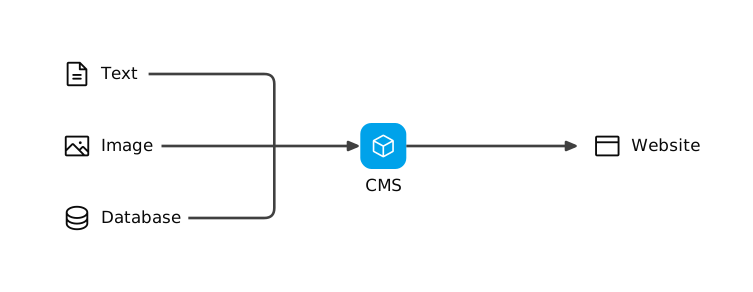
Section titled “What is a CMS”A CMS (Content Management System) is a system that lets you create, manage, and deliver data (content) such as text and images without writing code. You register, rewrite, and delete data from a management console.
What is a headless CMS
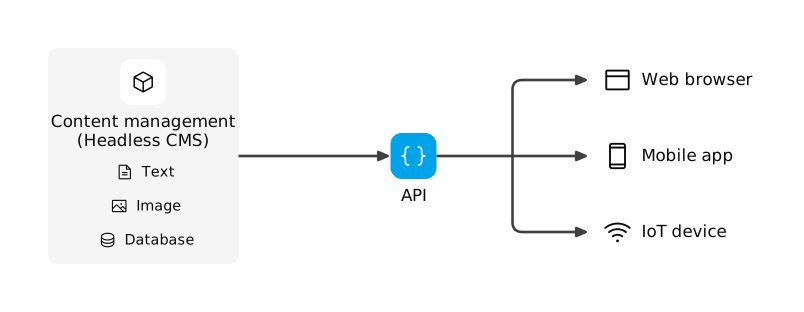
Section titled “What is a headless CMS”What Re:Earth CMS does is manage and deliver the data you register. The screen that displays the data, a website or an app, is something you prepare yourself. The data is delivered to that screen through an API.
Because the display screen is not fixed on the Re:Earth CMS side, you can deliver the same data to more than one destination. Not only the destinations but also the routes for registering data can be multiple. Besides the management console, Re:Earth CMS can receive data from a separate input screen through an API. The data inside Re:Earth CMS remains a single copy, so when you correct it, the correction reaches every destination.
A CMS shaped this way, managing and delivering data while you prepare the display screen, is called a headless CMS.
For example, when you build a website with a traditional CMS, the system that manages the data and the pages that display it are one integrated system, and the data you register can only be used inside that website. To deliver the same content in an app as well, you end up building another set of management on the app side, and the management of identical data grows with the number of destinations.
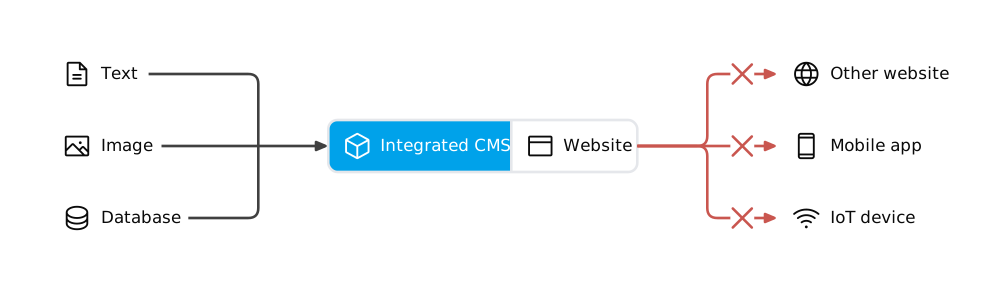
With a headless CMS, on the other hand, the management of data is separated from display. Management is unified in one place, and the same data can be delivered to a website, an app, and even to a device such as digital signage. A headless CMS also carries no processing for assembling a display, which makes it lighter and quicker to respond. What sets it apart is that you decide what to use the data for, what technology to build with, and what to combine it with, without rebuilding the data.
What you can do with Re:Earth CMS
Section titled “What you can do with Re:Earth CMS”Re:Earth CMS lets you do the following.
- Use it as the database for an app or a website. You decide the structure and types of your data first, that is, which items hold values of which type. Your app or website reads and writes the data through an API. The data written is accumulated according to the structure and types you decided. You can run it like a simple database.
- Deliver the same data in more than one form. You can deliver it by showing it on a map, turning it into a list page, or exporting it in a format a spreadsheet can open. Whichever form you deliver in, the original data is a single copy, and every destination receives the same content.
- Collect data through more than one route and run it with several people. You build a separate input screen for the people recording data in the field, and Re:Earth CMS receives what they enter as data. Because the data sits in one place and several people touch it, you can decide per role who may create, edit, and publish data, and publish through review and approval. A change history of the data also remains, so you can trace how it got there later.
The strengths of Re:Earth CMS
Section titled “The strengths of Re:Earth CMS”While you are considering whether to adopt Re:Earth CMS, the following two are its strengths.
- The same data can be used across multiple destinations. This is a strength common to headless CMSs. You can add destinations later without changing how the data is managed.
- Geospatial data can be handled as it is. Geometry Object and Geometry Editor are provided as fields for holding positions and shapes. GeoJSON and 3D Tiles files can also be stored and delivered as assets.
Once you are actually operating Re:Earth CMS, keeping data under management over a long period and dividing the work among several people become your challenges. Re:Earth CMS has features that support these two.
- Data can be rolled back to a past version. A version history remains, and you can choose a past version and restore it.
- Models can reference each other. You hold the same information in only one model and connect the others to it by reference. Management of the data stays divided per model.
- Information for operational use can be attached separately from the main schema. For example, you can hold information for operational use, such as who checked it and when it is to be reviewed, alongside the data itself.
- What each role can do can be separated. There are four roles, Owner, Maintainer, Writer, and Reader, and you assign one to each person.