Decide the model's structure first
Last updated
When several people enter data, the way values are written can vary from person to person. For example, with building information, one person may write “Residential” in the use column, while another person writes “Residence”. A value such as “1985?” may also end up in the year built column.
The person who entered them knows that “Residential” and “Residence” mean the same use, but in the data they are two different values. A program that counts buildings by use counts them as two different values, so the totals per use come out wrong. Which year “1985?” stands for is also known only to the person who entered it, and the people using the data cannot judge whether to trust the value. Inconsistent data like this is hard to use for anyone other than the person who entered it and knows what the values mean, and hard for programs to use. When data entry is left to each person’s judgment, the inconsistency spreads as the data grows.
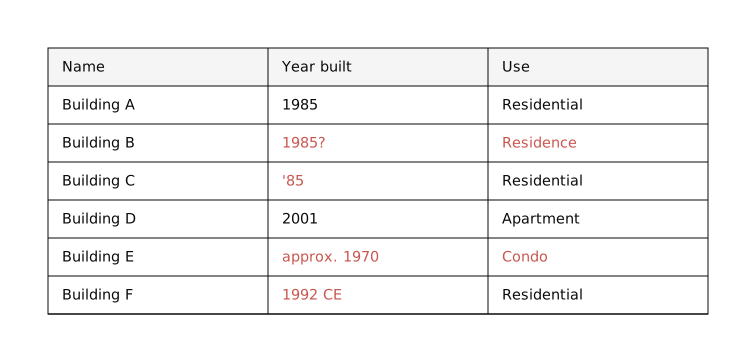
To prevent this kind of inconsistency and make the data easy to use for people and programs other than the person who entered it, the basis of data management is to define, before entering data, which pieces of information hold which values. Data management in Re:Earth CMS also starts there: you decide where the data goes, and you define the values that go there.
A model is a box you put data into
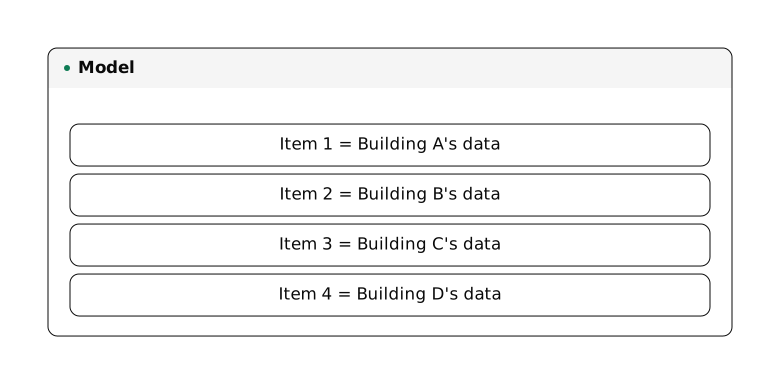
Section titled “A model is a box you put data into”A box you put data into is called a model. In Re:Earth CMS, each piece of data you put into a model is called an item. To handle building data, you create one model for buildings and put in one item per building. To handle 100 buildings, you put 100 items into that one model.
A schema is the definition you decide before entering data
Section titled “A schema is the definition you decide before entering data”In Re:Earth CMS, when you create a model, you decide the structure of the data that goes into that model as a schema. The schema is the definition you set up before entering any data.
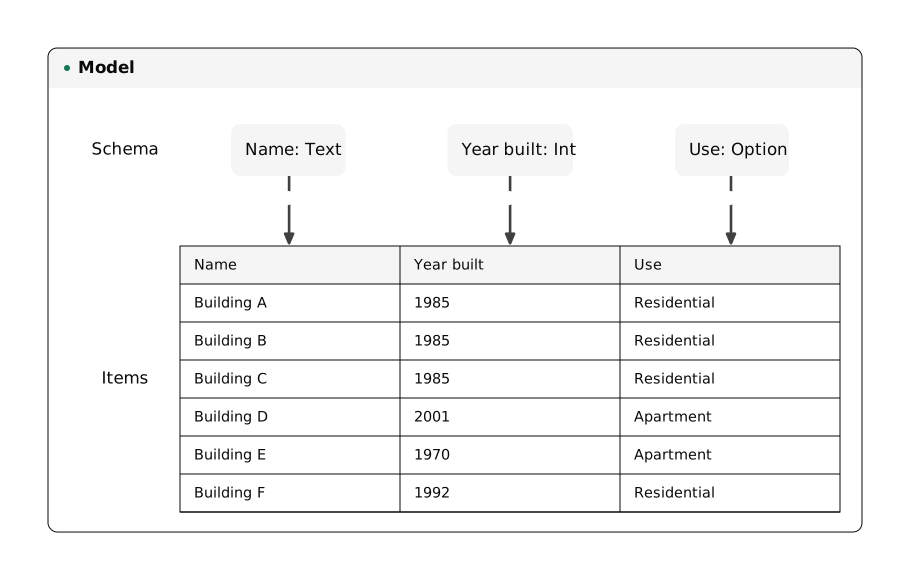
What the schema decides is which pieces of information make up the data in that model. For example, in the building model this article uses as its example, the data for one building is represented by three pieces of information: “Name”, “Year built”, and “Use”. Each of these pieces of information is called a field.
To define a field, you give the field a name and decide which values may be entered in it. The three fields in this article’s example can be defined as follows.
- Make the “Name” field a Text field. A building’s name is free text, so any characters can be entered.
- Make the “Year built” field an Int (integer) field. This field holds only the year the building was built, so a value with characters mixed in, such as “1985?”, can no longer be entered.
- Make the “Use” field an Option field. To keep the spelling from varying, as with “Residential” and “Residence”, the value is chosen from options prepared in advance.
A schema decided first prevents inconsistency
Section titled “A schema decided first prevents inconsistency”Once the schema is decided first, whoever enters the data, the only values that can go into an item are those that fit the schema’s definition. Whether the values are consistent is decided by the schema, not by the judgment of the person entering them, so the people who manage the data keep its quality through the mechanism rather than through whoever happens to be doing the work.
When the values are consistent, other people and programs can use the data as it is, without asking the person who entered it what the values mean. For example, when another person counts the buildings by use, the value of the “Use” field is one of the options prepared in advance, so buildings of the same use are counted as the same value. An app that shows a list of the buildings on a website also receives the data through the API in the fields the schema defines, so it can display the values it receives as they are. The data is no longer something only the person who entered it has on hand; it becomes easy for other people and programs to use.
Re:Earth CMS is designed on this way of thinking about data management.