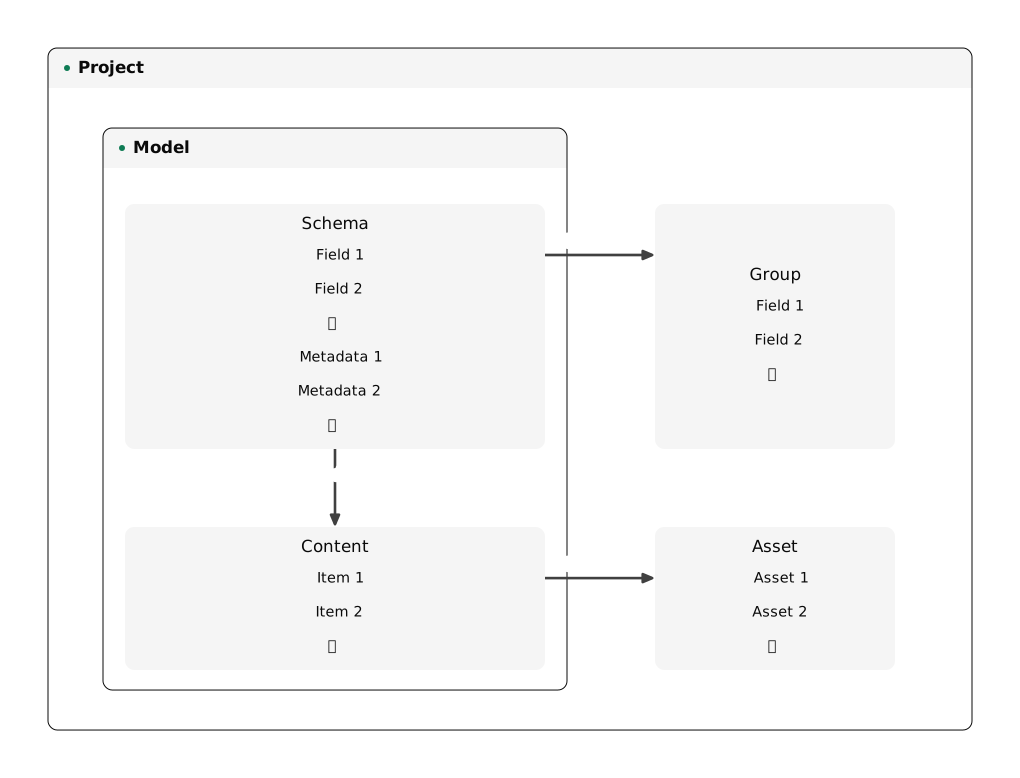
What Re:Earth CMS consists of
Last updated
In Re:Earth CMS, users create models inside a project and manage their data by putting it into them. Knowing what each part of Re:Earth CMS is makes the design easier to work out: which data goes into which model, which definitions are reused across models, and where files are kept.
- Project: the unit that manages models, items, groups, and assets together. One project can have more than one model.
- Model: the unit for handling one kind of data together. One model has one schema and one content.
- Schema: the mechanism that defines which fields and metadata an item has. One schema can define more than one field.
- Field: the input rule for a value entered into an item.
- Metadata: the input rule for managing an item. It is defined in the schema, separately from the fields.
- Content: the collection of items. One content can hold more than one item.
- Item: each piece of data put into a model. Values go into an item according to the fields the schema defines.
- Group: the mechanism for bundling the definitions of several fields so that more than one model can reuse them. More than one model can refer to it through a Group field in its schema.
- Asset: a file uploaded to the project. Items in more than one model can refer to it through an Asset field.