タイムラインを再生する
更新日
このガイドを終えると、プラグインから Re:Earth Visualizer のタイムラインを制御できるようになります。時間範囲の設定、再生・一時停止、速度の調整、時間の進行に応じた処理が可能になります。このガイドは、reearth.yml と拡張ファイルの基本的な構造を把握していることを前提としています。
タイムラインは、シーンの時系列データとアニメーションを駆動します。reearth.timeline を通じて、プラグインはタイムラインの範囲設定、再生・一時停止、速度変更、進行に応じたイベント受信ができます。
サンプルコード
Section titled “サンプルコード”この例では、時計と 再生 ボタン・一時停止 ボタンを持つ小さなパネルを表示します。再生 をクリックすると 2023 年を通じてタイムラインが進み、時計が現在時刻をリアルタイムで更新します。
reearth.yml
id: timeline-pluginname: Timeline Pluginversion: 1.0.0extensions: - id: timeline-demo type: widget name: Timeline Demotimeline-demo.js
reearth.ui.show(`  <style>    html, body { margin: 0; font-family: sans-serif; }    #panel { padding: 16px; color: #000; background: #fff; width: 260px; }    #time { font-family: monospace; }    button { margin-right: 8px; padding: 4px 12px; }  </style>  <div id="panel">    <p>現在時刻: <span id="time">-</span></p>    <button id="play">再生</button>    <button id="pause">一時停止</button>  </div>  <script>    document.getElementById("play").addEventListener("click", function () {      parent.postMessage({ action: "play" }, "*");    });    document.getElementById("pause").addEventListener("click", function () {      parent.postMessage({ action: "pause" }, "*");    });
    window.addEventListener("message", function (e) {      if (e.data?.action === "tick") {        document.getElementById("time").textContent = e.data.time;      }    });  </script>`);
reearth.timeline?.setTime?.({  start: new Date("2023-01-01T00:00:00Z"),  stop: new Date("2023-12-31T23:59:59Z"),  current: new Date("2023-01-01T00:00:00Z"),});
reearth.timeline?.setSpeed?.(3600 * 2);
reearth.extension.on("message", (message) => {  if (message?.action === "play") {    reearth.timeline?.play?.();  }  if (message?.action === "pause") {    reearth.timeline?.pause?.();  }});
reearth.timeline?.on?.("tick", (currentTime) => { reearth.ui.postMessage({ action: "tick", time: currentTime.toISOString() });});時計と 再生 ボタン・一時停止 ボタンを持つパネルが表示されます。再生 をクリックするまでは何も動きません。クリックすると 2023 年を通じて時計が進みます。一時停止 をクリックすると、その時点で止まります。
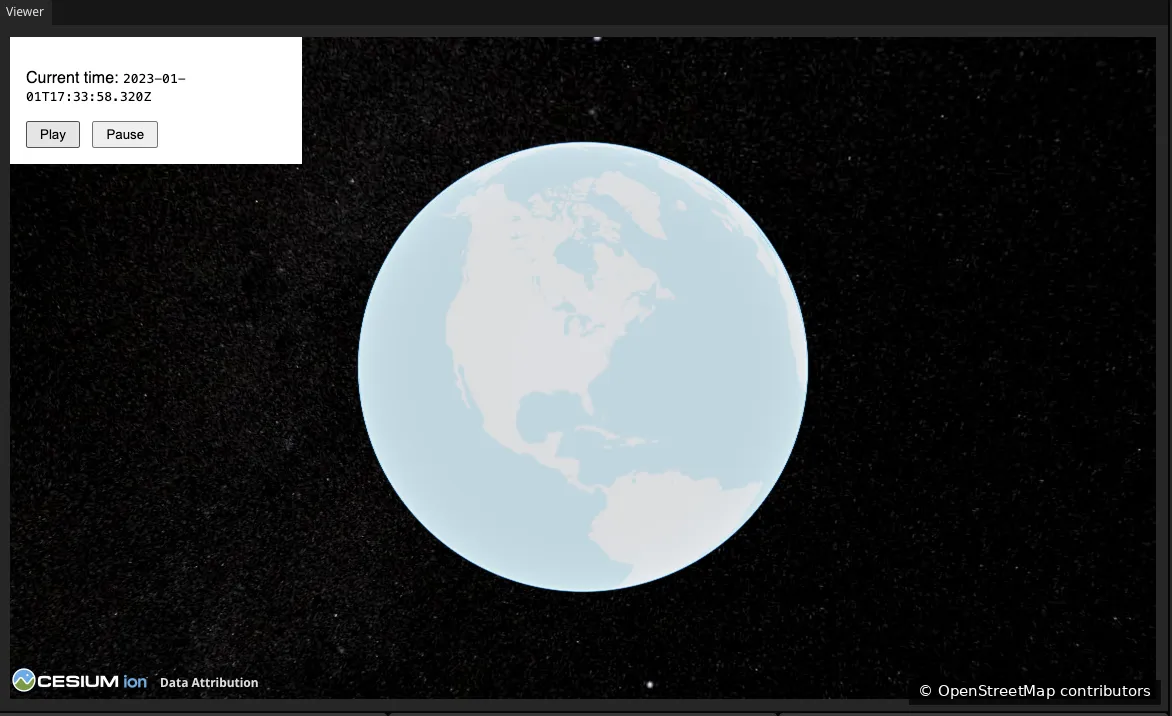
地図データ提供:OpenStreetMap
reearth.timeline 名前空間は、タイムラインの範囲設定、再生制御、時間進行への反応のためのメソッドを提供します。
時間範囲を設定する
setTime はタイムラインの範囲と開始位置を定義します。3 つの Date 値を持つオブジェクトを渡します。
reearth.timeline?.setTime?.({ start: new Date("2023-01-01T00:00:00Z"), stop: new Date("2023-12-31T23:59:59Z"), current: new Date("2023-01-01T00:00:00Z"),});start: タイムラインの開始時刻。stop: タイムラインの終了時刻。current: 再生を開始する位置。
再生を制御する
play は現在位置からタイムラインを開始し、pause はリセットせずに停止します。
reearth.timeline?.play?.();reearth.timeline?.pause?.();速度を設定する
setSpeed はリアルタイムに対するタイムラインの進行速度を制御します。値はリアル 1 秒あたりのタイムライン秒数です。1 はリアルタイム、3600 * 2 は 1 秒あたり 2 時間です。
reearth.timeline?.setSpeed?.(3600 * 2);時間の変化に反応する
tick イベントは再生中に現在時刻が進むたびに発火します。ハンドラは現在時刻を Date として受け取ります。ハンドラは軽量に保ち、ティックごとに重い処理やログ出力を行わないようにしてください。
reearth.timeline?.on?.("tick", (currentTime) => { reearth.ui.postMessage({ action: "tick", time: currentTime.toISOString() });});次のステップ
Section titled “次のステップ”- reearth.timeline API リファレンス:
stepType、rangeTypeを含むタイムラインメソッド・プロパティ・イベントの全一覧 - プラグインと Re:Earth の間で通信する: UI ボタンが拡張ロジックにメッセージを送る仕組み