Communicate between a Plugin and Re:Earth
Last updated
By the end of this guide, you will be able to send messages in both directions
between your extension’s logic and its user interface—from the logic to the UI,
and from the UI back to the logic. This guide assumes you are familiar with the
basic Plugin structure of reearth.yml and an extension file, and that you
have read How the Plugin System works.
A Plugin runs in two parts: the extension logic runs on the WebAssembly side, where it can access Re:Earth Visualizer data, and the UI runs inside an iframe, where it can render HTML. These two parts cannot call each other directly—they communicate by passing messages. Sending data from your logic to your UI, or reacting in your logic when a user clicks a button in your UI, both happen through this messaging.
Sample code
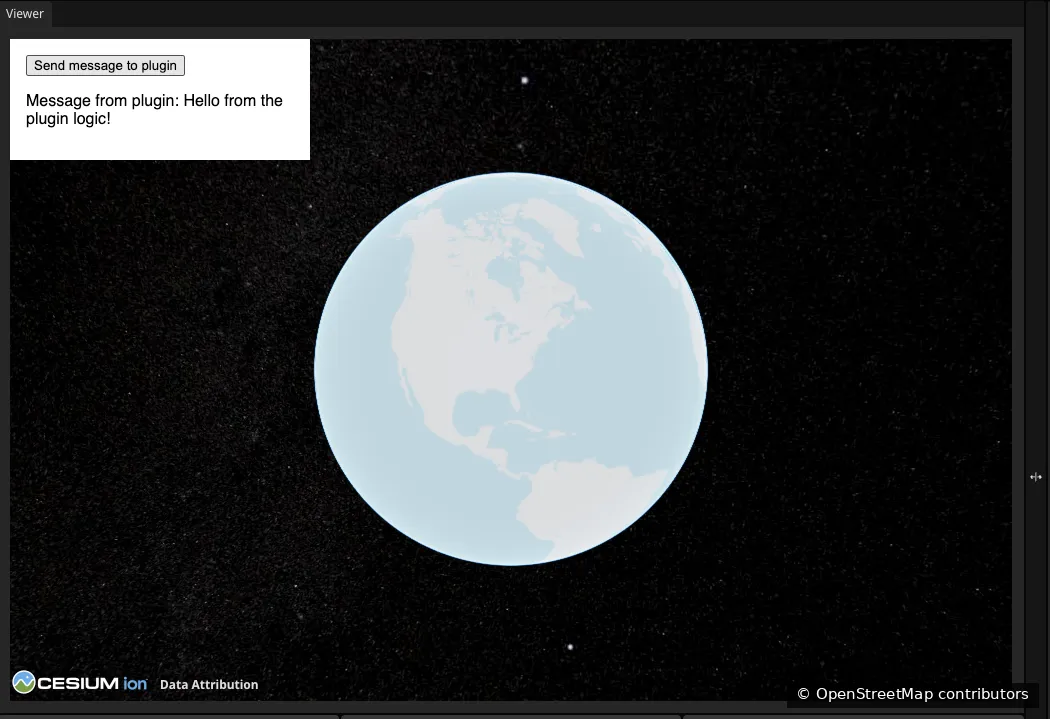
Section titled “Sample code”This example renders a UI with a button. Clicking the button sends a message from the UI to the extension logic, which logs it. The extension also sends a greeting to the UI when it loads, which the UI displays.
reearth.yml
id: messaging-demo-pluginname: Messaging Demo Pluginversion: 1.0.0extensions: - id: messaging-demo type: widget name: Messaging Demomessaging-demo.js
reearth.ui.show(`  <style>    html, body { margin: 0; width: 300px; font-family: sans-serif; }    #wrapper { padding: 16px; color: #000; background: #fff; }  </style>  <div id="wrapper">    <button id="send">Send message to plugin</button>    <p>Message from plugin: <span id="msg"></span></p>  </div>  <script>    document.getElementById("send").addEventListener("click", function () {      parent.postMessage({ action: "buttonClicked" }, "*");    });
    window.addEventListener("message", function (e) {      if (e.data?.action === "greet") {        document.getElementById("msg").textContent = e.data.payload;      }    });  </script>`);
reearth.extension.on("message", (message) => {  if (message?.action === "buttonClicked") {    console.log("The UI button was clicked.");  }});
reearth.ui.postMessage({ action: "greet", payload: "Hello from the plugin logic!" });
Result
Section titled “Result”The widget shows a button and a greeting received from the extension logic. Clicking the button logs a message to the browser console.
How it works
Section titled “How it works”Messages travel in two directions. Each direction uses one method to send and
one to receive, and each message carries an action field so the receiver
knows what kind of message it is.
From the extension logic to the UI
The extension logic sends a message with reearth.ui.postMessage:
reearth.ui.postMessage({ action: "greet", payload: "Hello from the plugin logic!" });The UI receives it with a standard browser message event listener. The
message content arrives in the event’s data property:
window.addEventListener("message", function (e) { if (e.data?.action === "greet") { document.getElementById("msg").textContent = e.data.payload; }});From the UI to the extension logic
The UI sends a message with parent.postMessage. The second argument, "*",
is required:
parent.postMessage({ action: "buttonClicked" }, "*");The extension logic receives it by subscribing to the message event with
reearth.extension.on:
reearth.extension.on("message", (message) => { if (message?.action === "buttonClicked") { console.log("The UI button was clicked."); }});Using an action field
Both sides may receive different kinds of messages over time. Including an
action field on every message and checking it before acting lets each side
tell messages apart. This is a convention, not a requirement, but it keeps your
messaging predictable as a Plugin grows.
What you can send
Messages must be serializable as JSON. Plain objects, arrays, strings, numbers,
and booleans work. Values that cannot be serialized as JSON, such as
ArrayBuffer or Blob, cannot be sent directly. To send binary data, encode
it as a base64 string first.
What’s next
Section titled “What’s next”- reearth.ui API reference:
postMessage,show, and other UI methods - reearth.extension API reference: the
messageevent and other extension capabilities - How the Plugin System works: why a Plugin is split into two sides