Using Public API (Write)
Last updated
This page explains how to create an item (POST) using Public API.
Prerequisite: enable Public API
Section titled “Prerequisite: enable Public API”To make a model’s data postable via Public API, you need to enable that model on the Posting tab of the Public API page.
-
Open the project’s Public API page
-
Select the Posting tab
-
Add at least one allowed origin. Requests from a browser are only accepted from the origins specified here
-
Turn on the Enable toggle for the target model
-
Click the Save Changes button
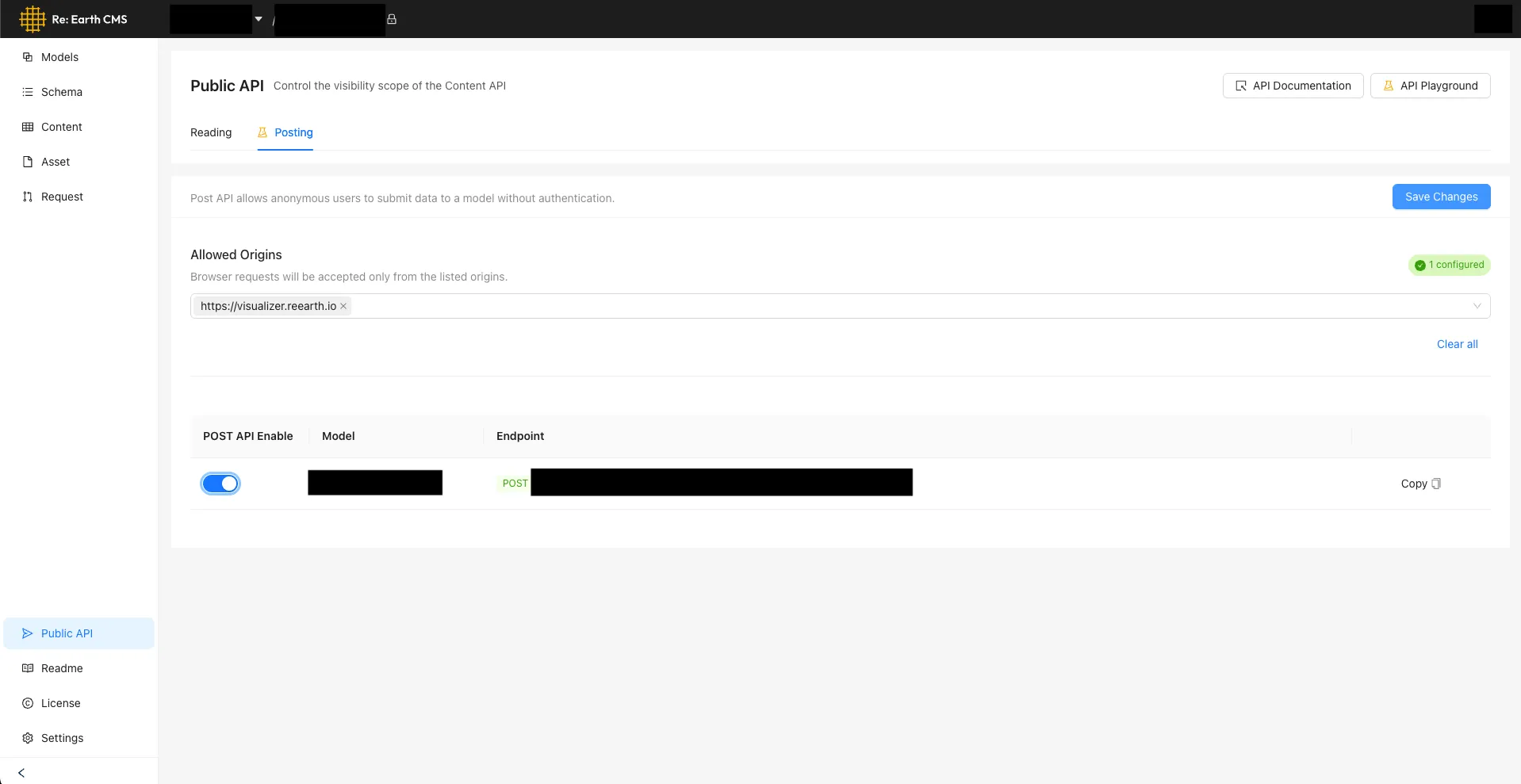
Click the Copy button on screen to copy the curl request.
Create an item (POST)
Section titled “Create an item (POST)”Specify fields as JSON in a request to the POST /{model}/items endpoint to create a new item. No authentication is required. Replace the angle-bracketed placeholders such as <workspace_id_or_alias> with your actual values. The keys and values in fields depend on the target model’s field definitions. Here’s a sample.
curl -X POST 'https://api.cms.reearth.io/api/p/<workspace_id_or_alias>/<project_id_or_alias>/<model_id_or_key>/items' \ -H 'Content-Type: application/json' \ -d '{ "fields": { "<field-key-1>": "<value-1>", "<field-key-2>": "<value-2>" }}'$WORKSPACE_ID = "<workspace_id_or_alias>"$PROJECT_ID = "<project_id_or_alias>"$MODEL_ID = "<model_id_or_key>"
$uri = "https://api.cms.reearth.io/api/p/$WORKSPACE_ID/$PROJECT_ID/$MODEL_ID/items"$body = @{ fields = @{ "<field-key-1>" = "<value-1>" "<field-key-2>" = "<value-2>" }} | ConvertTo-Json
$resp = Invoke-RestMethod -Method Post -Uri $uri -ContentType "application/json" -Body $body$respconst WORKSPACE_ID = "<workspace_id_or_alias>";const PROJECT_ID = "<project_id_or_alias>";const MODEL_ID = "<model_id_or_key>";
const url = `https://api.cms.reearth.io/api/p/${WORKSPACE_ID}/${PROJECT_ID}/${MODEL_ID}/items`;
const body = { fields: { "<field-key-1>": "<value-1>", "<field-key-2>": "<value-2>", },};
const resp = await fetch(url, { method: "POST", headers: { "Content-Type": "application/json", }, body: JSON.stringify(body),});
if (!resp.ok) { const text = await resp.text(); throw new Error(`HTTP ${resp.status}: ${text}`);}
const data = await resp.json();console.log(data);