Using Public API (Read)
Last updated
This page walks you through making CMS data available via Public API and completing your first request.
Prerequisite: publish an item
Section titled “Prerequisite: publish an item”To retrieve data with Public API, you need to make two settings in the Re:Earth CMS management console.
- Set an item’s status to published
- Enable the model on the Reading tab of the Public API page
1. Publish an item
Section titled “1. Publish an item”In the Re:Earth CMS management console, change the status of the item you want to publish to Published.
2. Enable Public API
Section titled “2. Enable Public API”To make a model’s data retrievable via Public API, you need to enable that model on the Reading tab of the Public API page.
-
Open the project’s Public API page
-
Select the Reading tab
-
Turn on the Enable toggle for the target model
-
Click the Save Changes button
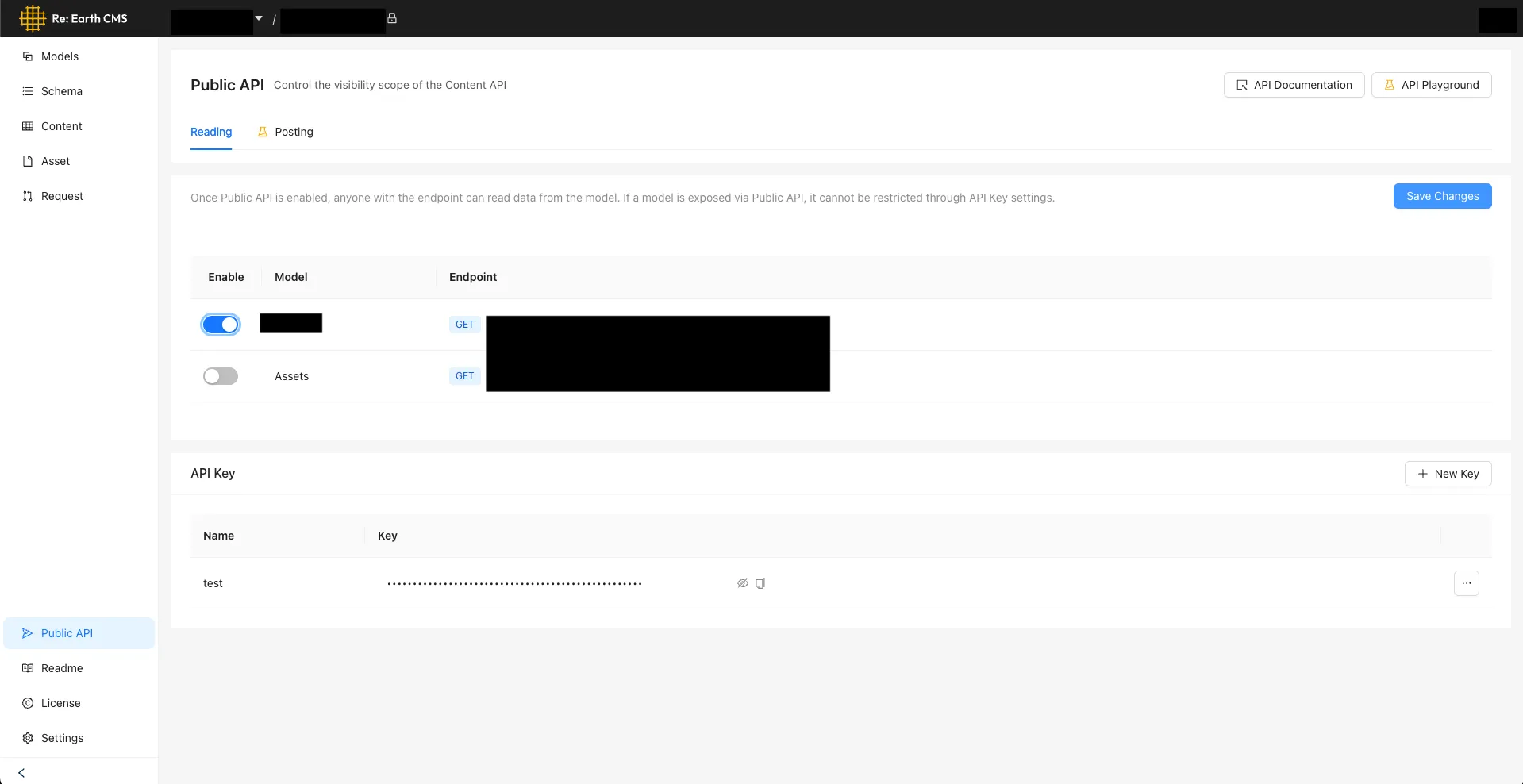
The API Key section is further down the same Public API page: the next section, “Set up an API key,” is done from there.
3. Set up an API key (private projects only, optional)
Section titled “3. Set up an API key (private projects only, optional)”If the project’s visibility is private, you can control access by issuing an API key. Public projects don’t need an API key.
Setup steps:
-
Open the project’s Public API page
-
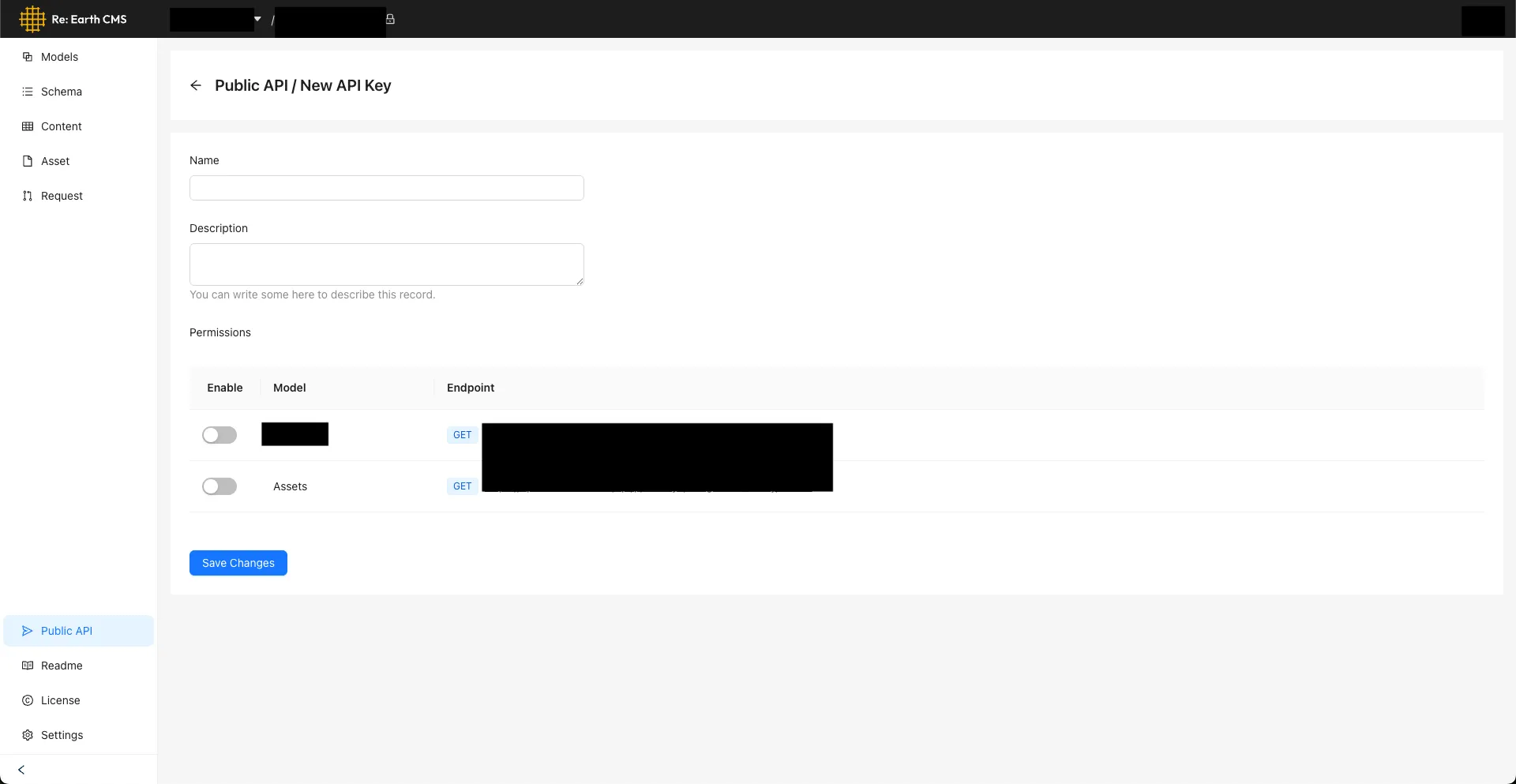
Click the + New Key button in the API Key section
-
Enter a name and description, set Permissions for the target models, and click Save Changes
-
The new API key is added to the API Key section. Copy it to use it with your external application

Attach the issued API key to the Authorization header of your requests.
curl 'https://api.cms.reearth.io/api/p/<workspace>/<project>/<model>' \ -H 'Authorization: Bearer <your_api_key>'Retrieve a list of items (GET)
Section titled “Retrieve a list of items (GET)”Once your publishing settings are in place, you can retrieve a list of items from the following URL. No API key is needed for public data. Replace the angle-bracketed placeholders such as <workspace_id_or_alias> with your actual values.
GET https://api.cms.reearth.io/api/p/<workspace_id_or_alias>/<project_id_or_alias>/<model_id_or_key>curl --location --request GET \ 'https://api.cms.reearth.io/api/p/<workspace_id_or_alias>/<project_id_or_alias>/<model_id_or_key>'$WORKSPACE_ID = "<workspace_id_or_alias>"$PROJECT_ID = "<project_id_or_alias>"$MODEL_ID = "<model_id_or_key>"
$uri = "https://api.cms.reearth.io/api/p/$WORKSPACE_ID/$PROJECT_ID/$MODEL_ID"$resp = Invoke-RestMethod -Method Get -Uri $uri$respconst WORKSPACE_ID = "<workspace_id_or_alias>";const PROJECT_ID = "<project_id_or_alias>";const MODEL_ID = "<model_id_or_key>";
const url = `https://api.cms.reearth.io/api/p/${WORKSPACE_ID}/${PROJECT_ID}/${MODEL_ID}`;
const resp = await fetch(url, { method: "GET", headers: { Accept: "application/json", },});
if (!resp.ok) { const text = await resp.text(); throw new Error(`HTTP ${resp.status}: ${text}`);}
const data = await resp.json();console.log(data);